ChatGPT Apps: Complete FAQ Guide 2026
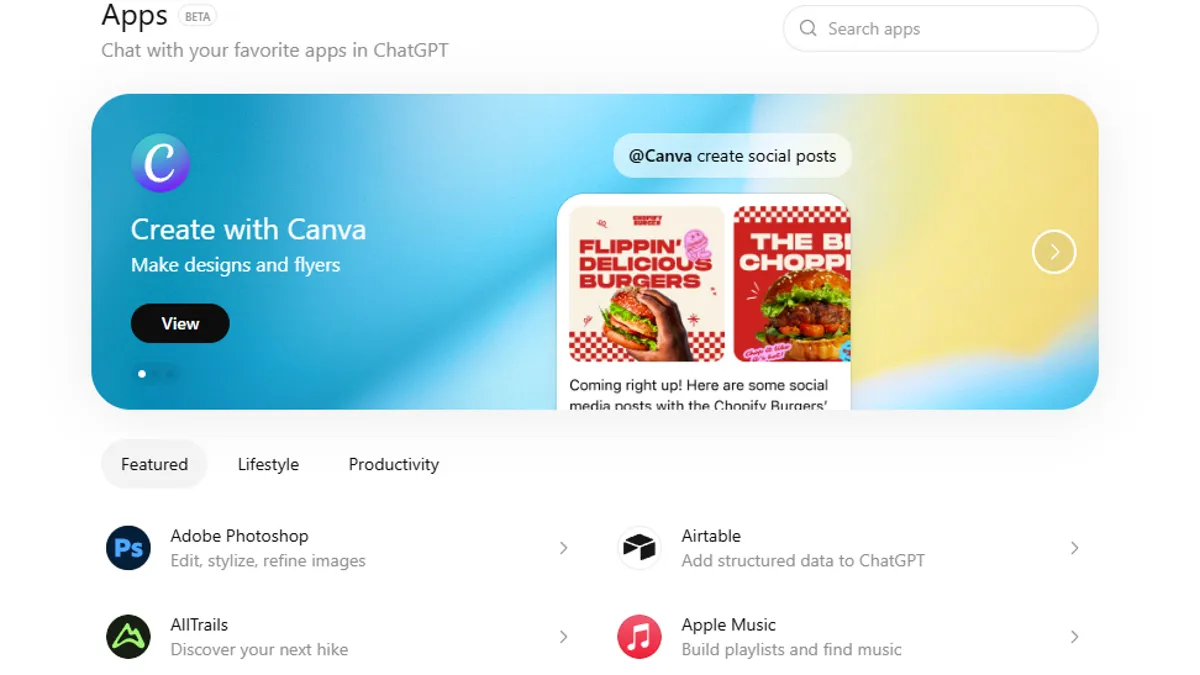
Since OpenAI launched the ChatGPT App Store on December 18, 2025, thousands of developers have rushed to understand how to build, publish, and monetize apps for the platform. This comprehensive FAQ addresses every common question about ChatGPT apps based on official documentation, developer feedback, and real-world experiences from the first weeks of the app store.
WHAT ARE CHATGPT APPS?
Q1: What exactly is a ChatGPT app?
A ChatGPT app is a tool or service that extends ChatGPT's capabilities by integrating external functionality directly into conversations. Instead of leaving ChatGPT to use a separate tool, users can trigger an app and interact with it seamlessly within the chat interface.
Think of it like adding powerful extensions to ChatGPT. When you're chatting with ChatGPT and need to book a flight, search real estate listings, create a design, or order food, ChatGPT can suggest or connect you to the appropriate app—all without leaving the conversation.
Q2: How is a ChatGPT app different from a ChatGPT plugin or custom GPT?
ChatGPT Apps (New - 2025):
- Live in the ChatGPT App Store
- Can be discovered by 800 million weekly active users
- Provide interactive, real-time functionality
- Support rich UI elements (maps, carousels, forms, payment buttons)
- Can perform actions directly in the chat
ChatGPT Plugins (Deprecated):
- Were the precursor to apps
- Allowed text-based API integrations only
- Had limited discoverability
- Officially discontinued by OpenAI in favor of apps
Custom GPTs:
- Are conversational AI tools trained on specific data
- Don't integrate external services or perform actions
- Are simpler to create but less powerful
- Cannot access real-time data or external APIs
Key Difference: ChatGPT apps are designed to do things (book flights, create designs, order food), while custom GPTs are designed to know things (answer questions about your data or expertise).
Q3: What's the difference between an app and an integration?
Integration:
- Your existing service (like Spotify or DoorDash) connects to ChatGPT
- Example: DoorDash's integration lets users order food through ChatGPT
App:
- A new tool you build specifically for ChatGPT's environment
- Example: A travel assistant app you create to help users plan trips
In practice, many apps are integrations of existing services adapted for ChatGPT. You can build either.
Q4: Can personal users (non-developers) create ChatGPT apps?
Not directly. You need technical knowledge or a technical partner to build apps. However, you can:
- Use no-code platforms (Zapier, Make, n8n) to create app logic without coding
- Hire developers to build your app
- Partner with a technical co-founder
- Use AI coding assistants (Cursor, GitHub Copilot, Claude) to help you code
OpenAI is not currently offering a no-code visual app builder like some competitors, so technical skills (or outsourcing) are required.
Q5: Who benefits most from ChatGPT apps?
Business Categories:
- E-commerce companies (product discovery, shopping)
- Travel platforms (booking, recommendations)
- Productivity tools (task management, file access)
- Design platforms (creation, editing)
- Educational services (courses, tutoring)
- Financial services (investments, banking)
- Lifestyle services (fitness, wellness, meditation)
- Content creators (music, video, writing)
Individual Developers:
- Can create niche tools for specific audiences
- Can build integrations if they have coding skills
- Can earn revenue if monetization is implemented correctly
BUILDING CHATGPT APPS
Q6: What do I need to build a ChatGPT app?
Technical Requirements:
- An API (a way for ChatGPT to communicate with your service)
- Authentication system (if your app accesses user data)
- Chat-native UI (interfaces that work in ChatGPT's chat window)
- Error handling (graceful failures with helpful messages)
- Fast response times (ideally under 2 seconds)
Knowledge Requirements:
- Backend development (Node.js, Python, etc.)
- API design and integration
- OAuth or authentication systems
- Understanding of web services
Tools You'll Use:
- OpenAI Apps SDK (provided by OpenAI)
- Your preferred backend framework (Express, Flask, FastAPI)
- OpenAI's UI library for chat-native interfaces
- Testing and deployment tools
Q7: How do I start building a ChatGPT app?
Step-by-Step:
- Visit OpenAI's Developer Platform: Go to platform.openai.com
- Access Apps Documentation: Read the complete Apps SDK guide
- Review Examples: Study OpenAI's open-source example apps
- Set Up Your Environment: Install necessary dependencies and tools
- Define Your Idea: Plan what problem your app solves
- Build Your Backend: Create an API that ChatGPT can call
- Implement Authentication: If needed, add OAuth or user login
- Design Your UI: Use OpenAI's UI library for chat-native interfaces
- Test Locally: Use Developer Mode in ChatGPT to test
- Submit for Review: Package and submit to OpenAI for approval
Q8: What programming languages can I use?
Any language that can create a web API works:
- Best for APIs: Node.js/JavaScript, Python, Go, Rust
- Works: Java, C#, PHP, Ruby
- Also Works: Any language capable of exposing HTTP endpoints
OpenAI provides official examples in Python and TypeScript/JavaScript, so starting with these is easiest.
Q9: How long does it take to build a ChatGPT app?
Simple Apps (1-2 API endpoints):
- Development time: 2-4 weeks
- Example: A weather lookup app or quote generator
Medium Apps (5-10 API endpoints, authentication):
- Development time: 4-8 weeks
- Example: A product search or travel booking app
Complex Apps (20+ endpoints, rich UI, database integration):
- Development time: 8-16 weeks
- Example: A full-featured e-commerce or booking platform
After Launch:
- Review process: 5-10 business days
- Total from concept to live: 3-6 months
Q10: Do I need to host my own servers?
Yes. Your API must run on a server that ChatGPT can call. Options:
Cloud Hosting (Recommended):
- Vercel: Easy Node.js deployment ($0-20/month)
- AWS: Scalable but more complex (pay-as-you-go)
- Google Cloud: Similar to AWS, good documentation
- Railway: Simple deployment ($5-50/month)
- Replit: Easy for beginners, includes free tier
Self-Hosted:
- Your own servers
- Full control but more maintenance
Platform as a Service:
- Firebase, Supabase for backend logic
- Zapier, Make for workflow automation
Most small-to-medium apps cost $10-100/month to host initially.
Q11: Can I use an existing service's API (like Spotify's API) to create a ChatGPT app?
Yes, absolutely. Many ChatGPT apps are built by wrapping existing APIs. For example:
- Spotify app: Wraps Spotify's API for ChatGPT
- DoorDash app: Wraps DoorDash's services
- Zillow app: Wraps Zillow's listings API
Requirements:
- The service must allow third-party integration
- You need an API key or developer access
- You must comply with their terms of service
- You often need permission from the company
For major platforms, reach out to their developer relations team to discuss your ChatGPT app idea.
Q12: What's the Model Context Protocol (MCP) and do I need it?
MCP (Model Context Protocol) is OpenAI's emerging standard for how AI assistants communicate with external tools and data sources.
Current Status (December 2025):
- MCP is supported but optional for ChatGPT apps
- Built into Claude 3.5 Sonnet by Anthropic
- OpenAI is integrating deeper with ChatGPT
Do You Need It?
- For basic ChatGPT apps: No, not required
- For future compatibility: Yes, implementing MCP makes your app more future-proof
- For advanced features: May become required for some capabilities
Bottom Line: Start with traditional APIs. Upgrade to MCP support later as the standard matures.
PUBLISHING CHATGPT APPS
Q13: How do I submit my ChatGPT app to the app store?
Submission Process:
- Complete Your App: Ensure it's fully functional and tested
- Create App Manifest: Define your app's name, description, icon, and capabilities
- Document Your API: Provide clear documentation of how your API works
- Set Up Authentication: If needed, implement OAuth for user data access
- Go to OpenAI Developer Platform: Visit platform.openai.com
- Navigate to App Submissions: Find the "Submit App" section
- Fill Out Submission Form: App name (max 100 characters), description, icon (512x512 PNG), screenshots (3-5 examples), privacy policy URL, support email, company/developer info
- Review Requirements: Ensure compliance with safety, privacy, and quality standards
- Submit: Complete the submission
- Wait for Review: OpenAI reviews within 5-10 business days
Q14: What are OpenAI's app submission requirements?
Safety & Compliance:
- App must be appropriate for all audiences
- No hate speech, violence, illegal activity, or explicit content
- Comply with OpenAI's usage policies
- Comply with all third-party API terms of service
Privacy & Data Handling:
- Comprehensive privacy policy (publicly accessible)
- Only request data necessary for the app to function
- Clear disclosure of what data is collected and how it's used
- Secure data handling practices
- GDPR and other privacy law compliance
Quality Standards:
- Professional UI/UX design
- Responsive design (works on mobile and desktop)
- Fast performance (API responses under 2 seconds)
- No broken links or missing functionality
- Comprehensive error handling with helpful messages
- Clear documentation for users
Technical Requirements:
- API must be publicly accessible
- Authentication must be secure
- No hard-coded secrets or API keys
- Must support the latest OpenAI SDK version
Q15: What happens if my app is rejected?
OpenAI will provide specific feedback explaining why. Common rejection reasons:
- Privacy concerns: Unclear data handling or missing privacy policy
- Safety issues: Content violates guidelines
- Technical problems: API errors, slow performance, broken links
- Quality issues: Poor UI/UX, incomplete implementation
- Compliance issues: Violates third-party terms of service
Next Steps:
- Review OpenAI's feedback carefully
- Address the specific issues they identified
- Resubmit your app with improvements
- Average resubmission approval time: 5-10 days
Most apps are approved on first submission if they meet the requirements carefully.
Q16: How do I update my app after it's published?
Updates Are Automatic:
- If you update your backend API, ChatGPT automatically uses the new version
- No need to resubmit to OpenAI for minor updates
- Changes take effect immediately
When Resubmission Is Needed:
- Major feature changes
- Changes to privacy policy or data handling
- Icon, description, or branding changes
- Security updates that change API structure
Best Practice:
Version your API endpoints (e.g., `/v1/`, `/v2/`). This allows you to maintain backwards compatibility while building new features.
Q17: Can I unpublish or delete my app?
Yes. You can remove your app from the ChatGPT App Store anytime through your developer dashboard. Your app will:
- Disappear from the directory
- Become unavailable for new users
- Stop functioning for existing users (if they try to use it)
However, existing users may still have your app saved in their chat history.
Q18: Do I need a company to publish a ChatGPT app?
No. Individual developers can publish apps. You need:
- A valid email address
- A privacy policy (can be a simple document hosted on your website)
- Support contact information (can be your personal email)
Many solo developers have published successful ChatGPT apps.
MONETIZATION
Q19: Can I monetize my ChatGPT app right now (December 2025)?
Official Monetization:
Not yet. OpenAI has not launched in-app monetization features.
Workaround Monetization (Available Now):
- Link Out to Your Website: Users discover your app in ChatGPT, then click "Visit Website" or "Complete Purchase" to go to your site where they buy
- Lead Generation: Capture emails in ChatGPT, sell to interested parties later
- Affiliate Marketing: Link to affiliate products and earn commissions
- Premium Website Features: Free ChatGPT app, paid features on your website
Q20: When will OpenAI launch in-app monetization?
OpenAI stated they're "exploring additional monetization options over time, including digital goods."
Expected Timeline:
- Mid-2026: Likely introduction of monetization features
- What's expected: Ability to charge for premium features, digital goods, or subscriptions within ChatGPT
OpenAI's Likely Model:
- 70-85% goes to developers (similar to app stores)
- 15-30% goes to OpenAI as platform fee
Q21: How much money can I make from a ChatGPT app?
Realistic Earnings Scenarios:
Scenario 1: Free App + Link to Paid Website
- 1,000 monthly active users
- 5% conversion to website
- 50 conversions × $50 average order = $2,500/month
Scenario 2: Premium Feature in ChatGPT (When Available)
- 10,000 monthly active users
- 2% pay for premium ($9.99/month)
- 200 users × $9.99 × 70% (developer take) = $1,400/month
Scenario 3: High-Traffic App with Multiple Monetization
- 100,000+ monthly active users
- Website traffic ($5,000/month)
- Premium features ($3,000/month)
- Affiliate commissions ($2,000/month)
- Total: $10,000+/month
Factors Affecting Earnings:
- Quality and usefulness of your app
- Your marketing and promotion efforts
- Category (e-commerce typically earns more than utilities)
- How well your app converts users to customers
Q22: What's the best monetization strategy for ChatGPT apps?
For E-Commerce/Booking Apps:
- Link out to your website/app to complete purchases
- Example: Zillow, DoorDash, Booking.com
For Productivity/Utility Apps:
- Offer premium features within ChatGPT (when available)
- Link to paid subscriptions on your website
- Example: Canva, Coursera
For Content/Media Apps:
- Premium content bundles (songs, templates, courses)
- Affiliate marketing
- Example: Spotify, Apple Music
Recommended Approach:
- Build a great free app (gain users)
- Drive users to your website (capture emails)
- Offer premium tiers on your website
- When ChatGPT in-app monetization launches, add premium features
- Consider affiliate partnerships for additional revenue
Q23: Do I need my own business/company to earn money?
No. Individual developers can earn money from apps. You'll need:
- A way to receive payments (Stripe, PayPal, etc.)
- A privacy policy
- A terms of service
When you earn money, you'll owe taxes based on your jurisdiction. Consult an accountant or tax professional.
Q24: Can I charge users a subscription to use my ChatGPT app?
Directly in ChatGPT:
Not yet (expected 2026)
Currently Available:
- Create a freemium model: Free basic features in ChatGPT, premium features on your website
- Charge on your website before allowing API access
- Require users to log in with their premium account
Example Flow:
- User tries your app in ChatGPT (basic features)
- User clicks "Unlock Premium" or "Full Features"
- Redirects to your website
- User subscribes ($9.99/month)
- Premium features unlock
DISCOVERY & MARKETING
Q25: How do users discover my ChatGPT app?
Automatic Discovery:
- ChatGPT suggests your app contextually in relevant conversations
- Example: If discussing travel, ChatGPT might suggest your travel app
- Users see your app in the ChatGPT app directory
Manual Discovery:
- Users search the app directory by name
- Users @mention your app directly ("@TravelApp, find flights to Paris")
- You promote your app through your website, social media, marketing channels
Q26: How does the ChatGPT recommendation system work?
OpenAI's algorithm considers:
- User intent: What the user is talking about
- App relevance: How well your app matches that intent
- User quality: How well previous users rated your app
- Performance metrics: How fast and reliable your app is
- Engagement: How often users interact with your app
Key Insight: Building a remarkable app that users love is the best way to get recommended. OpenAI prioritizes suggestions that benefit the user experience.
Q27: What marketing strategies work for ChatGPT apps?
In-App Growth:
- Get positive reviews and ratings (users can rate apps)
- Optimize your app description with relevant keywords
- Professional icon and screenshots
Out-of-App Growth:
- Website: Create a landing page promoting your app
- Blog: Write about your app's capabilities
- Social media: Show examples of your app in action
- Communities: Share in relevant Reddit, Discord, Product Hunt
- Press: Reach out to tech media (especially early apps get coverage)
- Partnerships: Collaborate with complementary apps
Direct Outreach:
- Email users about your ChatGPT app
- YouTube/TikTok: Create tutorials showing how to use your app in ChatGPT
Q28: Can I create a waitlist for my app before launch?
Yes. Best practices:
- Create a landing page with a waitlist signup form
- Drive traffic through marketing, social media, partnerships
- Build anticipation by sharing updates about your app
- Prepare a launch with coordinated marketing push
- Convert waitlist into early users when you launch
Successful waitlists grow 100-10,000+ before launch, giving you immediate traffic.
TECHNICAL QUESTIONS
Q29: What APIs can ChatGPT apps integrate with?
Any REST API works. Popular integrations include:
- Payment: Stripe, PayPal, Square
- E-commerce: Shopify, WooCommerce, custom platforms
- Travel: Booking.com, Skyscanner, Kayak
- Real Estate: Zillow, Redfin, MLS databases
- Music: Spotify, Apple Music, YouTube Music
- Design: Canva, Figma, Adobe APIs
- Productivity: Notion, Airtable, Google Workspace
- Maps: Google Maps, Mapbox
- News/Content: News APIs, RSS feeds
- Weather: OpenWeatherMap, Weather API
- Custom APIs: Your own backend services
Q30: How secure is ChatGPT app data?
OpenAI's Security:
- Data transmitted between ChatGPT and your app is encrypted
- OpenAI maintains security standards (SOC 2, GDPR compliant)
- User authentication is handled securely
Your Responsibility:
- Secure your API with authentication
- Use HTTPS (not HTTP)
- Validate and sanitize all user inputs
- Protect API keys (never hard-code them)
- Follow data protection best practices
- Comply with privacy laws (GDPR, CCPA, etc.)
Q31: Can users' data be seen by OpenAI?
OpenAI does not see user data sent to your app. However:
What OpenAI Sees:
- That a user triggered your app
- Basic metadata (timestamps, app name)
- Your app's response (which may include user data)
What You Need to Know:
- Your privacy policy should disclose all data handling
- You must secure user data on your servers
- Users should understand what data flows where
LEGAL & COMPLIANCE
Q32: Do I need to comply with any laws?
Yes. Your app must comply with:
Privacy Laws:
- GDPR (if serving EU users)
- CCPA (if serving California residents)
- LGPD (if serving Brazilian users)
- Other regional privacy laws
Requirements:
- Privacy policy (clear, publicly accessible)
- Terms of service
- Data processing agreements (if handling sensitive data)
- Right to delete user data
- Data breach notification procedures
Best Practice:
- Consult a lawyer familiar with your jurisdiction
- Use privacy policy templates tailored to your app
- Be transparent about data collection and use
Q33: What intellectual property rights do I have?
You Own:
- Your app's code and functionality
- Your app's design and UI
- Any content you create
OpenAI Owns:
- The ChatGPT platform and interface
- The OpenAI brand and trademarks
- The Apps SDK and related tools
Users:
- Own their data and conversations
- Grant you permission to use data necessary for your app
Q34: Can I use third-party code or libraries in my app?
Yes. Open-source libraries are commonly used. Requirements:
- Comply with the library's license (MIT, Apache 2.0, GPL, etc.)
- Include proper attribution
- Understand copyleft requirements (some licenses require you to open-source your code)
Recommended Licenses (most permissive):
- MIT License
- Apache 2.0 License
- BSD License
Restrictive Licenses (be careful):
- GPL (requires your code to be open-source too)
- AGPL (very restrictive)
COMPARISON WITH COMPETITORS
Q35: How do ChatGPT apps compare to other AI platforms?
vs. Claude Apps (Anthropic):
- Claude: More powerful reasoning, longer context window
- ChatGPT: 800M weekly users, larger audience reach
- Both: Support similar app architectures
vs. Google's Gemini Integrations:
- Gemini: Integrations exist but less mature
- ChatGPT: More established app ecosystem (as of Dec 2025)
vs. Traditional App Stores (iOS, Android):
- ChatGPT apps: Discovered in chat, no installation needed
- App stores: Require installation, deep user friction
- ChatGPT: Potentially higher conversion due to conversational discovery
vs. Custom GPTs:
- GPTs: Easier to build, limited functionality
- Apps: More powerful, require development skills
Competitive Advantage of ChatGPT Apps:
- Massive audience (800M weekly users)
- Conversational discovery (contextual recommendations)
- First-mover advantage (app store still new)
- Direct integration into ChatGPT workflow
Q36: Will other AI platforms launch app stores?
Likely yes. Timeline expectations:
- Claude/Anthropic: Likely 2026 (early)
- Google Gemini: Likely 2026 (mid-year)
- Meta AI: Potentially 2026-2027
Early Mover Advantage: Building ChatGPT apps now gives you advantage before competitors' platforms mature. Many successful apps will later port to other platforms.
GETTING HELP & RESOURCES
Q37: Where can I get help building my ChatGPT app?
Official Resources:
- OpenAI Developer Documentation: platform.openai.com/docs/apps
- OpenAI Community Forum: community.openai.com
- GitHub Examples: github.com/openai/apps-examples
Communities:
- Discord: OpenAI Community Discord
- Reddit: r/OpenAI, r/ChatGPT
- Twitter: Follow @OpenAI and app developers
- Product Hunt: Latest ChatGPT app launches
Paid Help:
- Hire developers on Upwork, Fiverr, or GitHub
- Partner with AI development agencies
- Coding bootcamps offering ChatGPT app courses
AI Coding Assistants:
- GitHub Copilot: Auto-complete code
- Cursor: AI-native code editor
- Claude: Chat-based coding help
Q38: Are there grants or funding for ChatGPT app developers?
OpenAI has not announced official grants (as of Dec 2025), but:
Funding Sources:
- Venture capital: Pitch to VCs interested in AI
- Angel investors: Networks like AngelList
- Y Combinator: Startup accelerator (accepts AI founders)
- Tech accelerators: Microsoft, Google, Amazon accelerators
Bootstrap:
- Many successful apps are bootstrapped by founders
- Start small, validate with users, reinvest profits
- This is a viable path for solo developers
Q39: When should I launch my ChatGPT app?
Best Practices:
- Build MVP First: Don't wait for perfection
- Get Beta Users: Test with 20-50 early users before launch
- Gather Feedback: Iterate based on real usage
- Launch When Ready: When your app solves the stated problem well
- Post-Launch Iteration: Continue improving based on user feedback
Timing Considerations:
- Early launch: Benefit from early adopter interest and press coverage
- Late launch: Learn from competitors' mistakes, larger user base to target
Recommendation: Launch in early 2026 if you're still building. The ChatGPT app ecosystem is still young—early apps have significant visibility advantage.
FAQs ABOUT FAQS
Q40: Are these FAQs up to date?
This FAQ reflects the state of ChatGPT apps as of December 2025. OpenAI is rapidly evolving the platform, so:
- Check platform.openai.com/docs/apps regularly for updates
- Follow OpenAI's announcements for new features
- Join communities to stay informed of changes
- These fundamentals likely remain accurate through 2026
Major Changes to Watch For:
- In-app monetization launch (expected mid-2026)
- New app capabilities and features
- Performance improvements and optimizations
- Integration with other OpenAI products
FINAL THOUGHTS
ChatGPT apps represent a genuine opportunity to reach hundreds of millions of users and build a sustainable business. The platform is young, competition is still limited, and early movers have significant advantages.
Start building today. The best time to launch was yesterday. The second-best time is now.
Hire X Creators for Your Brand
Connect with verified X creators and launch powerful marketing campaigns with secure escrow protection.