How to Create ChatGPT Apps and Monetize Them: Complete 2026 Guide
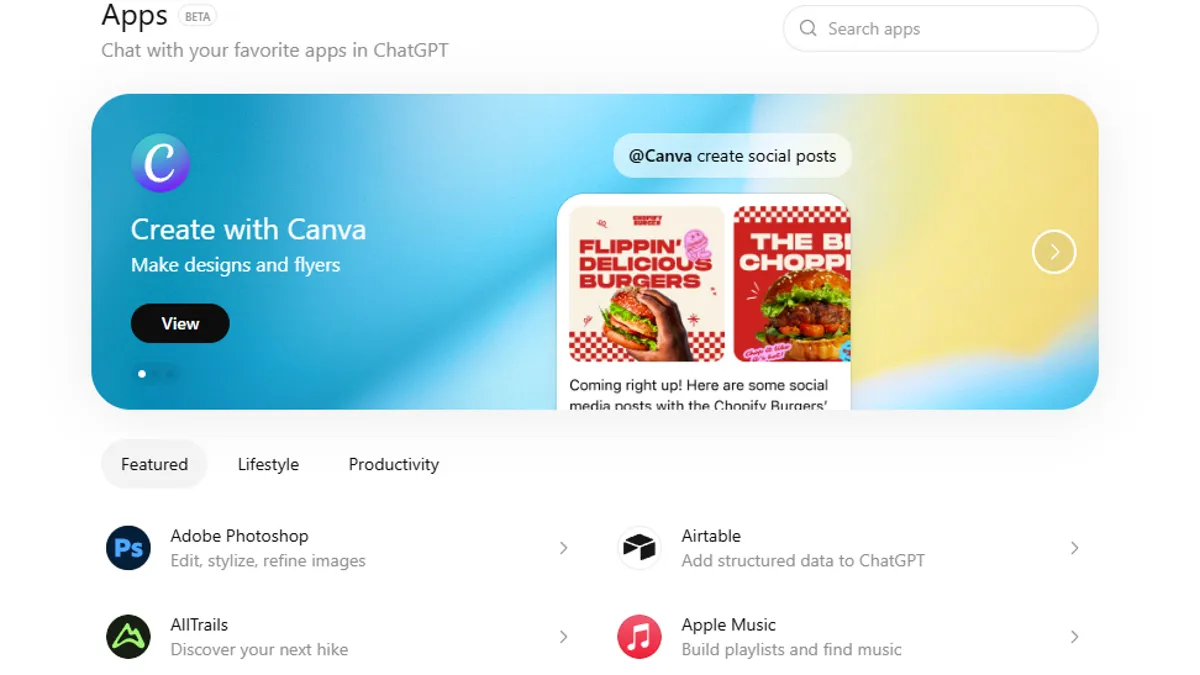
OpenAI just launched the ChatGPT App Store on December 18, 2025—a seismic shift that gives developers direct access to 800 million weekly active ChatGPT users. For the first time, you can build apps that live inside conversations with users, get discovered naturally through ChatGPT's recommendations, and potentially monetize directly. This is not theoretical—developers are already building, with major brands like Spotify, DoorDash, Zillow, Canva, Coursera, and Apple Music launching integrations.
This comprehensive guide reveals exactly how to create ChatGPT apps, submit them for approval, and monetize them using the strategies already emerging in late 2025.
Why ChatGPT Apps Matter (And Why You Should Build One)
The numbers are staggering. ChatGPT's mobile app alone generated $3 billion in consumer spending by December 2025—reaching this milestone in just 31 months, faster than TikTok (58 months), Disney+ (42 months), or HBO Max (46 months).
But here's what matters for app developers: the ChatGPT App Store represents a paradigm shift in how apps get discovered and used.
Traditional app stores:
Users search for apps, download them, manage multiple apps. Friction-heavy.
ChatGPT App Store:
Users describe what they need in conversation. ChatGPT suggests the perfect app automatically. One-click integration. Friction-free.
Analysis suggests the ChatGPT App Store could eventually cost Apple and Google $44 billion annually in redirected digital spending as users shift from traditional app stores to the ChatGPT marketplace. This is your window to capture early-adopter momentum.
Understanding the ChatGPT Apps Platform
ChatGPT apps are fundamentally different from traditional apps. They're conversation-native, context-aware, and integrated seamlessly into ChatGPT's interface.
What ChatGPT Apps Can Do:
- Extend conversations with new context (pull data from APIs, databases, external sources)
- Let users take actions without leaving the chat (order groceries, book travel, create presentations)
- Respond to natural language commands ("Spotify, make a playlist for my party this Friday")
- Include interactive interfaces (maps, playlists, presentations, forms) directly in the chat
- Get suggested contextually by ChatGPT when relevant to the conversation
Examples of Live Apps (December 2025):
- Spotify: Create playlists, discover music
- DoorDash: Order groceries and food
- Zillow: Search and browse real estate listings
- Canva: Transform outlines into slide decks
- Coursera: Take courses within ChatGPT
- Booking.com: Search travel accommodations
- Apple Music: Browse and create music experiences
- Dropbox: Access and summarize documents
Step 1: Understand the Apps SDK and Requirements
Before building, understand what you need.
OpenAI's Apps SDK is available in beta and provides a complete toolkit for developers to create ChatGPT apps. The SDK includes:
- Official documentation and guidelines
- Open-source example apps demonstrating best practices
- Open-sourced UI library for chat-native interfaces
- Step-by-step quickstart guide
- Developer Mode in ChatGPT for testing
Technical Requirements:
- Basic familiarity with APIs and web development
- Ability to build or integrate an API that ChatGPT can call
- Understanding of OAuth or authentication for user data
- Support for the Model Context Protocol (MCP)—OpenAI's emerging standard for AI-assistant communication
You can build apps with Node.js, Python, or any language capable of exposing HTTP APIs.
Conceptual Requirements:
- Think about real user intent, not just technology
- Design for conversation-first experiences
- Create apps that are useful within 2-3 exchanges
- Consider what context ChatGPT can provide automatically
Step 2: Define Your App Idea
The best ChatGPT apps solve specific problems in ways that benefit from:
- Conversational discovery (user describes what they need)
- Real-time context awareness (ChatGPT knows what the user is doing)
- Seamless action-taking (no need to leave the chat)
Good ChatGPT App Ideas:
- ✅ Productivity tools (task management, note-taking, file access)
- ✅ E-commerce integrations (shopping, product discovery, recommendations)
- ✅ Content creation (design tools, writing assistants, media generation)
- ✅ Travel and lifestyle (booking, restaurant recommendations, local search)
- ✅ Financial tools (budgeting, investment research, banking)
- ✅ Educational platforms (courses, learning materials, tutoring)
- ✅ Health and wellness (fitness tracking, meditation, health advice)
Less Suitable Ideas:
- ❌ Apps that don't integrate naturally into conversation
- ❌ Tools that require extensive manual configuration
- ❌ Apps that don't provide immediate value in the chat
- ❌ Experiences that feel like "leaving ChatGPT" to accomplish tasks
Example: Strong App Idea
"Travel Concierge: When users mention planning a trip in any conversation, ChatGPT can suggest the Travel Concierge app. Users describe their trip (dates, budget, interests), and the app provides personalized recommendations for flights, hotels, activities, and restaurants—all within the chat with real-time availability and instant booking."
Step 3: Build Your App Using the Apps SDK
Building a ChatGPT app follows this architecture:
- Backend: Your API that ChatGPT calls
- Integration: OpenAI SDK that connects your API to ChatGPT
- UI: Chat-native interfaces for interactive elements
Step-by-Step Development:
Step 1: Set Up Your Backend
- Create an API endpoint that accepts requests from ChatGPT
- Define clear schemas for what your app accepts and returns
- Implement authentication if your app needs user data
Example endpoint:
POST /api/chatgpt/get-recommendations
Input: {user_preferences, budget, location}
Output: {recommendations[], prices[], availability[]}
Step 2: Implement the Apps SDK
- Use OpenAI's SDK to expose your API to ChatGPT
- Define your app manifest (name, description, icon, capabilities)
- Specify authentication requirements and OAuth flow
Example manifest:
{
"name": "Travel Concierge",
"description": "Find and book travel experiences",
"auth_type": "oauth",
"capabilities": ["search_flights", "book_hotels", "find_activities"],
"icon_url": "https://yourapp.com/icon.png"
}
Step 3: Build Chat-Native UI
- Use OpenAI's open-sourced UI library for consistent design
- Create interactive elements (maps for Zillow-like experiences, playlists for music, carousels for products)
- Ensure all UI works seamlessly in ChatGPT's message interface
Step 4: Implement Authentication
- If your app accesses user data, implement OAuth
- First time users see a "Connect" button
- ChatGPT discloses what data will be shared
- User grants explicit permission
Step 5: Test with Developer Mode
- Enable Developer Mode in ChatGPT
- Test your app's natural language understanding
- Verify all interactive elements work correctly
- Test error handling and edge cases
Step 4: Submit Your App for Review and Publication
Once your app is production-ready, submit it.
- Visit OpenAI's Developer Platform: platform.openai.com
- Navigate to App Submissions
- Follow the app submission guidelines which require:
Safety & Compliance:
- App must be appropriate for all audiences
- Comply with OpenAI's usage policies
- Comply with any third-party APIs' terms of service
Privacy & Transparency:
- Provide a clear, comprehensive privacy policy
- Only request data necessary for the app to function
- Be transparent about what data gets shared
Quality Standards:
- Professional UI/UX design
- Responsive across devices
- Fast performance (sub-2 second response times)
- Comprehensive error handling
Submission Requirements:
- App name and description (max 100 characters)
- Icon (512x512 PNG)
- Screenshots (3-5 examples of the app in use)
- Privacy policy URL
- Support email
- Documentation link (if needed)
Review Timeline:
- OpenAI typically reviews apps within 5-10 business days
- You'll be notified of approval or requested changes
- Once approved, your app becomes available in the ChatGPT app directory
Featured Status:
Apps that meet higher design and functionality standards get featured more prominently. Featured apps appear in the directory and in conversations when contextually relevant. This dramatically increases discovery and usage.
Step 5: Optimize for Discovery and Adoption
Once live, drive users to your app.
In-App Discovery:
- Your app appears in the ChatGPT app directory (chatgpt.com/apps)
- ChatGPT suggests your app contextually when relevant to conversations
- Users can @mention your app by name to trigger it
Out-of-App Promotion:
- OpenAI allows deep linking—you can share links to your app page in ChatGPT directory
- Use your website, marketing channels, and social media to drive ChatGPT users to install your app
Example deep link structure:
chatgpt.com/apps/yourappname
Best Practices for Adoption:
- Design for zero-friction onboarding
- Make your first interaction incredibly useful
- Request minimal permissions upfront (ask for more data only when needed)
- Optimize your app description and icon for discoverability
- Encourage positive reviews and feedback
Step 6: Monetize Your ChatGPT App (Current and Future Strategies)
OpenAI has not yet launched in-app monetization, but multiple pathways are emerging.
Current Monetization Strategy (December 2025):
You can link out from your ChatGPT app to your website or native app to complete transactions. This means:
- User starts in ChatGPT using your app
- User finds what they want (flights, products, services)
- You link them to your website or app to complete the purchase
- You capture the revenue through normal e-commerce
Example: Travel Concierge app shows flights → user clicks "Book Now" → redirects to your website's booking page
Emerging Monetization Options (Coming 2026+):
OpenAI stated it's "exploring additional monetization options over time, including digital goods."
Possible future monetization includes:
- Premium Features Within Apps: Charge for advanced features ("Book with points," "Get VIP access")
- Freemium Model: Basic functionality free, premium features paid
- Subscription Services: Ongoing access to premium apps
- Digital Goods: Templates, presets, or content packs sold directly in ChatGPT
- Agentic Commerce Protocol: OpenAI's emerging standard supporting instant checkout directly in ChatGPT (coming 2026)
- Revenue Sharing: OpenAI takes a percentage of transactions (similar to app stores, but TBA)
Realistic Monetization Projections:
Based on current trends, expect:
- Take rate: 15-30% (if OpenAI implements platform fees)
- Revenue potential: $10,000-$1,000,000+ annually depending on app category and user acquisition
- Free apps: Drive brand awareness, user acquisition, directing traffic to your website
- Premium apps: Higher margins but slower adoption initially
Real-World ChatGPT App Success Stories (Actual Examples from Dec 2025)
Zillow Real Estate App:
- Allows users to search properties, view maps, and get recommendations within ChatGPT
- Estimated reach: millions of ChatGPT users
- Monetization: Link to Zillow.com for listing details, lead generation
- Success metric: Reduced friction in real estate discovery
Spotify Music App:
- Users create playlists, discover music through conversation
- Estimated reach: hundreds of millions of music streamers
- Monetization: Drive Spotify subscriptions
- Success metric: 10x+ engagement compared to traditional music discovery
Canva Design App:
- Transform outlines into slide decks, create designs
- Estimated reach: 10+ million designers
- Monetization: Premium design features, paid templates
- Success metric: Democratizes design creation
Strategies for Maximum Success
Strategy 1: Solve a Real Problem
- Survey your target users about their pain points
- Build an app that ChatGPT users will naturally reach for
- Test with real users before submission
Strategy 2: Optimize for Conversation
- Design for 2-3 exchange interactions, not lengthy processes
- Leverage ChatGPT's understanding of context
- Provide immediate value in the first interaction
Strategy 3: Build Network Effects
- Encourage users to share their creations (playlists, designs, travel plans)
- Create shareable content from within ChatGPT
- Build a community around your app
Strategy 4: Gather User Feedback
- Monitor user satisfaction (ChatGPT rating system)
- Collect feature requests from your user base
- Iterate quickly based on feedback
Strategy 5: Market Smartly
- Use your existing audience to drive ChatGPT app adoption
- Create content showing use cases
- Collaborate with complementary apps
- Partner with content creators and influencers using ChatGPT
Common Mistakes When Building ChatGPT Apps
Mistake 1: Over-Engineering
Building a fully-featured app instead of solving one specific problem. ChatGPT app users want simplicity and speed, not feature bloat.
Mistake 2: Ignoring Conversational UX
Designing for traditional app interfaces instead of chat-native experiences. The best ChatGPT apps feel like natural extensions of conversation, not separate tools.
Mistake 3: Poor Privacy Practices
- Requesting excessive data permissions
- Sharing data without clear user consent
- Not providing transparent privacy policies
Mistake 4: Slow Performance
Apps that take more than 2-3 seconds to respond lose users. Optimize API response times aggressively.
Mistake 5: Inadequate Error Handling
Users in ChatGPT expect smooth experiences. Cryptic error messages frustrate users. Implement graceful degradation and helpful error messages.
FAQs
Q1: Do I need coding experience to build ChatGPT apps?
Yes, you need at least intermediate development skills. You must be able to build an API (a way for ChatGPT to communicate with your service), implement authentication (secure login systems), and understand web development fundamentals. If you're not a developer, you have two options: (1) Partner with a developer, or (2) Use no-code/low-code tools like Zapier or Make that automatically create APIs for you, eliminating the need to code backend logic yourself.
Q2: How long does it take to build and submit a ChatGPT app?
Simple apps (basic API + UI): 2-4 weeks. Complex apps (authentication, database, rich UI): 6-12 weeks. Submission review: 5-10 business days. Total from concept to live: 3-4 months for a solid, production-ready app.
Q3: Can I monetize my ChatGPT app before OpenAI launches in-app monetization?
Yes. Current strategy: link out from your ChatGPT app to your website or native app where users complete transactions. This works well for e-commerce, travel booking, and subscription services. Once OpenAI launches in-app monetization (expected 2026), you'll have direct revenue opportunities.
Q4: What happens to my app if OpenAI changes its policies?
OpenAI has committed to supporting apps long-term, but they can modify policies. To protect yourself: (1) own your users through email lists, (2) build your own version of the app outside ChatGPT, (3) diversify across multiple platforms, (4) monitor OpenAI's announcements carefully.
Q5: Do I need to have an existing app or business to build a ChatGPT app?
No. You can build ChatGPT apps as a standalone business. However, the apps that succeed fastest are those with existing user bases or services to link to. For example, a travel booking site that adds a ChatGPT app gets more value than a standalone ChatGPT app alone. But pure ChatGPT apps can succeed if they're remarkable.
Hire X Creators for Your Brand
Connect with verified X creators and launch powerful marketing campaigns with secure escrow protection.